

When setting up your email account, you'll often be asked to choose between IMAP and POP3. Both are email protocols that allow you to receive messages, but they work in different ways and are suited to different business needs.
This guide explains the differences between IMAP and POP3 and helps you decide which option is best for your organization.
What Is IMAP?
IMAP (Internet Message Access Protocol) stores your emails on the mail server and synchronizes them across all your devices.
With IMAP, actions you perform on one device—such as reading, deleting, or organizing emails—are reflected on every device connected to the account.
Benefits of IMAP
- Access emails from multiple devices (desktop, laptop, smartphone, tablet)
- Emails remain stored on the server
- Changes sync automatically across devices
- Ideal for remote teams and shared work environments
- Easy backup and recovery since messages remain on the server
Best For
- Businesses with employees who use multiple devices
- Teams that need consistent access to email from different locations
- Organizations using modern cloud-based email services
What Is POP3?
POP3 (Post Office Protocol version 3) downloads emails from the mail server to a single device. In most configurations, messages are removed from the server after they are downloaded.
This means your email is primarily stored locally on the device that retrieves it.
Benefits of POP3
- Emails are available offline after download
- Reduces server storage usage
- Can provide faster access on a single device
- Simple setup for users who only access email from one location
Best For
- Users who access email from only one device
- Businesses with limited internet connectivity
- Situations where local email storage is preferred
IMAP vs. POP3: Key Differences
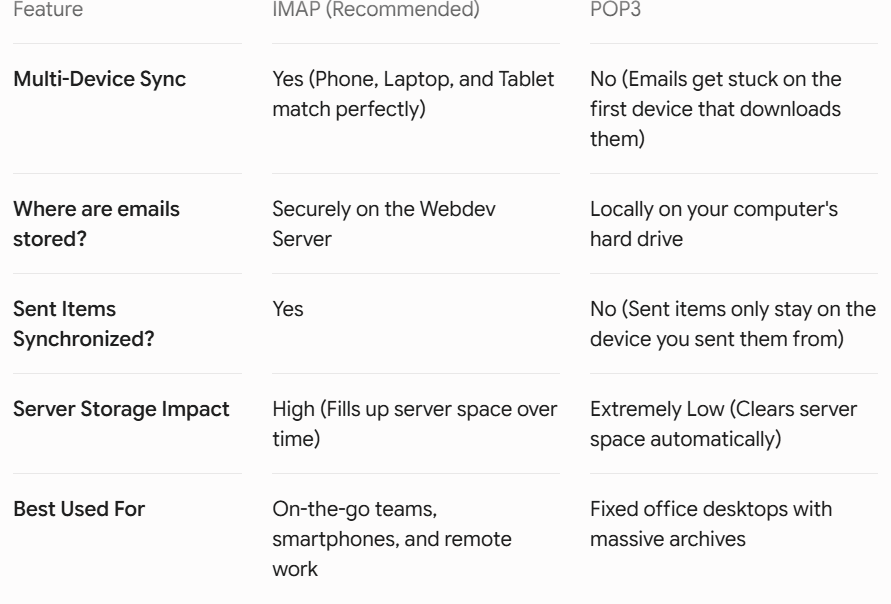
Which Should Your Business Choose?
For most businesses, IMAP is the recommended choice. It provides seamless synchronization across devices, supports remote work, and helps ensure employees always have access to the latest email data.
Choose POP3 only if:
- You use a single device for email access.
- You require local-only storage.
- You have specific legacy system requirements.